Thursday, November 21, 2013

Hour of Code

We live in a world surrounded by technology. But only a tiny fraction of students learn how computers work, or how to create software technology. Computer Science provides a foundation for virtually any career and all our students can benefit from learning the basics. 

This year, for Computer Science Education Week, a massive campaign called the Hour of Code is introducing 10 million students to try one hour of introductory computer science.

Watch the video below to find out more or check out the Hour of Code website by clicking here.  At Roosevelt, we are offering the Hour of Code to classrooms, and the computer club is participating during their meeting.   You can also participate at home if you'd like!   Check out the Hour of Code website if you are interested.


I hope everyone has a restful and relaxing Thanksgiving Break!

Thursday, November 14, 2013

iPads in K-2 at Roosevelt

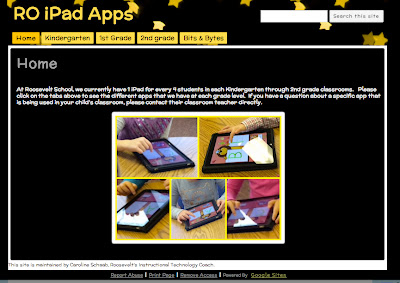
As you may or may not know, in Kindergarten through Second Grade, our classrooms have 1 iPad for every 4 students in their classrooms.   Each teacher is implementing these iPads in a way that best fits the needs of their classrooms, so it will not be the same in each classroom.  However, one of the questions that our primary teachers have been asked is what apps are on the iPads and where can we download them?   As of today, we now have these apps in a location for parents to see what apps are on the iPads and a link for you to download them.  Please take a moment to check out the new iPad Apps site!  If you have any questions, please let me know!


Check out the new RO iPad App Site

Wednesday, November 6, 2013

Common Sense Media: A Great Resource for Families

Common Sense Media is a wonderful resource for families to utilize in terms of seeking out what's going on in the world of media - which is a huge part of our children's lives today.  From movies, TV, apps, games, etc., Common Sense Media has a range of resources to help parents educate themselves on what's age appropriate and what's best for kids.   Common Sense Media is dedicated to improving the lives of kids and families by providing the trustworthy information, education, and independent voice they need to thrive in a world of media and technology. You can access a variety of content from Common Sense Media just by going on their site, however, there are even more resources if you create a free account.   Click here to visit Common Sense Media. 

One thing that I highly suggest reviewing together as a family is the  Digital Citizenship Section.  It's important in the world we live in today to be open about what the expectations are for being a good Digital Citizen, and how to stay safe online.   By law, we teach students on a yearly basis about what it means to a good digital citizen at school.  Common Sense Media has some great resources for how to continue this conversation at home. Click here if you'd like to read more and to see a helpful video you can share with your children.  

If you'd like to see a topic featured on the Roosevelt Bits and Bytes Blog, please leave a comment below.  I'd love to know what topics you'd like to see featured!  Thanks for reading!

Thursday, October 31, 2013

Virtual Field Trips

What is a Virtual Field Trip?

A Virtual Field Trip is when we a class can connect with an expert on a topic via a Google+ Hangout, a Google product similar to Skype allowing you to connect with various experts and/or classrooms at the same time.   Last year we participated in quite a few Virtual Field Trips, and this year, we are hoping to do the same.   Many of the institutions that offer Virtual Field Trips are Zoos, Aquariums, and Museums around the country.   This is a great free way to bring experts into the classroom, and give students an interactive experience not only with experts, but other students around the country.   Today, Mrs. Kulnig's 4th grade class participated in a Virtual Field Trip to the Atlanta Zoo called Myths and Misconceptions.    

It’s that time of year when everything seems a bit spooky! Are your fears of spiders, snakes and other creepy-crawlies based on facts or fiction? Cozy up to some of Zoo Atlanta’s “creepiest” creatures to find out how you might be giving some of the world’s most important animals a bad rap.  


On the Virtual Field Trip today, we met Quincy the Eurasian eagle owl, Maize the corn snake and Georgette the Tarantula.    Our Roosevelt 4th graders did an awesome job asking questions and participating in the Virtual Field Trip.   I'm hoping that we'll be able to have many classes participating in these Virtual Field Trips this school year.    If you'd like to see the field trip, watch the video above!


Up close and personal with Georgette, the tarantula at Zoo Atlanta.

"Hanging Out" with Quincy the Owl.

Wednesday, October 23, 2013

RAZ-KIDS iPad App

Our Kindergarteners through 3rd graders are very lucky to have a great resource available to them both at home and at school called Raz-Kids. Your children in K-3 can read and listen to books on Raz-Kids and even record themselves reading. Afterwards they can take a quiz to check for comprehension.

You can also monitor your child's progress using Raz-Kids.  You can see which books your student has been reading, send them messages, and review all their activity with our Parent Access area. Simply log in as your student, click the "Parents" link in the top right, and register.   

Our Roosevelt teachers are currently in the process of sending home the letters with log-in information for each student.   If you have any questions about your students log in information, please contact your child's teacher and they can help.  To access Raz-Kids, click on the picture above or scroll down to the helpful links section on the right hand side of the blog. 

Since we have subscriptions for our K-3 Students to Raz-Kids, we also have access to the Raz-Kids app for the iPad. This app lets you access eBooks and eQuizzes for the 300+ titles on Raz-Kids, all on your tablet!  In addition to engaging kids at their reading level and in their area of interest, this award-winning resouces gives kids 24/7 Web access to the practice they need to become better, more confident readers.  Please click here to download this FREE app to your iPad so that your students can have access to their eBooks and quizzes.   If you have any questions or problems, please let me know and I'd be happy to help you troubleshoot.   


Wednesday, October 16, 2013

What is a Chromebook?

Roosevelt 5th graders are using their Chromebooks for various assignments.
Right now at Roosevelt we have three fifth grade teachers who are on week 4 of having a class set of chromebooks in their classroom all day every day.  This "one to one" pilot is rotating through grades 3-5 over the course of the school year.   Each intermediate class gets to use the chromebooks for a six week period where they are devoted to their classroom.  You may be asking, what is a chromebook?  The video below explains this great computer that runs on the Google Chrome operating system.


Students and teachers have been using the Chromebooks over the past four weeks in a variety of different ways.  A lot of work the students do on the Chromebooks is in their Google Drive.   Their Google Drive have access to a variety of applications similar to the Microsoft Office Suite.  The nice thing about Google Drive is that not only can you access your work anywhere with computer access, but you can also collaborate with peers in real time on a document, presentation, etc.   Having the Chromebooks in the classroom all day every day (for six weeks) allows students access to online learning tools anytime, instead of teachers having to check out a computer cart to use it.   Teachers so far are reporting that students are able to use the Chromebooks more than traditional laptops, and both the students and teachers are loving this instant access to information.   I know that the three fifth grade classes are not looking to giving up the Chromebooks at the end of the month, however, two 3rd grade classes and one 5th grade class is very excited for this new addition in their classrooms.   We are excited for these to be traveling around the school, and have an additional cart of Chromebooks for teachers to be checking out and using as well.  We are hoping that one to one learning is something that we will see in the future at Roosevelt School.   Look at what Sal Khan has to say about the possible future of education in this clip from 60 Minutes below.   Do you see going one to one as a good idea in your child's classroom?  I'd love to hear your comments  by you posting below!


Wednesday, October 9, 2013

Teacher Technology Testimonial - Mrs. Marcell

Today's guest post comes from Mrs. Barclay Marcell.  She is a literacy teacher that services students in 1-5 here at Roosevelt School.   Mrs. Marcell received a SMART Board this year as a part of Roosevelt's 21 new SMART Boards that were installed this summer.  Below she shares how technology, specifically SMART Boards, have changed her practice - in two short months.   

There is literacy intervention before SMART Boards and literacy intervention after SMART Boards.

The advent of the SMART Board has taken prescribed, program-driven reading lessons and brought them to the big screen. Literally.  And along with it, a soaring level of student motivation and one excited teacher.

I think it was Einstein who said, "If I can see it, I can understand it."

So, take a 3rd grade Read Naturally fluency text about wolves – no color, stilted language, with a quiz to boot. Interject a podcast narration and a National Geographic video clip of wolves hunting and howling. Follow that up with Garage Band timed readings and iMovie kid reporting. The result? Reluctant readers are fighting over which text to tackle next. And their teacher is tempted to do a cartwheel.

Take a Phonics for Reading decodable text excerpt such as Jack got a cod fish. Not exactly edge-of-your-seat material. Well, put the sentence on the SMART Board and suddenly 1st graders are clamoring to highlight vowels, to scoop phrases, and of course to draw a picture of fisherman Jack. 

Take a sight word recitation exercise; add a SMART Board game from ABCya. Suddenly, you’ve got kids whose bank of known sight words was formerly in need of a bailout snapping and singing their the’s, what’s, and why’s.

Take the Storytown robust vocabulary words; add a ready made PowerPoint on the SMART Board and now 4th graders are predicting, connecting, and acting out words.

Take the Storytown lesson of the week for 2nd grade; add the Think Central site on the SMART Board, and kids are now relating literacy lesson content to their classroom focus. Skills and strategies are reinforced and grades improve. Success breeds success.

Take a teacher who wants to spark a love of reading; add the creativity and visual appeal of the SMART Board, plus the invaluable assistance of an awesome technology coach, and what do to get? Comprehension and Cartwheels.

We see it; we understand it.