Showing posts with label digital citizenship. Show all posts

Wednesday, March 5, 2014

Finding a Balance with Screen Time

I'm sorry that I haven't blogged in awhile, however, I was out on maternity leave.   I'm now back from leave ready to get back into the weekly keeping you informed routine.

One concern that parents and teachers often have when using technology is the topic of screen time and are our students getting too much screen time.   Media is everywhere for our students from T.V., Internet, Computers, iPads, Video Games, Cell Phones, etc.  According to the American Academy of Pediatrics, children today are spending an average of seven hours a day with entertainment media.

At school, our goal is to purposefully plan the use of technology in order to enhance instruction.   As teachers, we ask three questions to make sure we are planning to use technology effectively in the classroom:

  1. Is it appropriate?
  2. Is it meaningful?
  3. Is it empowering?
By asking ourselves these three questions, we are ensuring that we are using technology to enhance learning in a purposeful way, not just using iPads for example, to use iPads.   There are so many technology tools that enhance learning as well as other hands on manipulatives that don't use technology that as teachers, we need to make sure we keep a good balance of using both technology resources and non technology resources to make learning engaging and meaningful for kids. 

At home, it's important that screen time is balanced as well.   The American Academy of Pediatrics suggests the following ideas for parents:

  • Parents can model effective “media diets” to help their children learn to be selective and healthy in what they consume. Take an active role in children’s media education by co-viewing programs with them and discussing values.  
  • Make a media use plan, including mealtime and bedtime curfews for media devices. Screens should be kept out of kids’ bedrooms. 
  • Limit entertainment screen time to less than one or two hours per day; in children under 2, discourage screen media exposure. 

Do you think your family needs a media plan or media diet?   You can visit AAP's partner site, healthychildren.org, for tips on creating a Family Media Use plan.  Even if you don't formally create a plan for your family, there are some great talking points to be considered for children and adults alike. Common Sense Media also has some guidelines for elementary schoolers and middle schoolers in creating a family media plan.

  • Start with an endpoint. Use whatever tools you have -- your DVR, Netflix, OnDemand -- to pre-record shows, cue them up, or plan ahead to watch at a specific time. That way, one show won't flow into the other, and you can avoid commercials. If your kids are into YouTube, search for age-appropriate videos, and add them to a playlist to watch later. Because most games don't have built-in endings (and are, in fact, designed to make kids play as long as possible), set a timer or some other cue that says "time to stop."
  • Help them balance their day. Kids this age need guidance from you on a daily plan that includes a little bit of time for everything. And staying involved works: Kids whose parents make an effort to limit media use spend less time with media than their peers do, according to a 2010 Kaiser Family Foundation study.
  • Practice what you preach. It's tempting to keep reaching for your phone to check email, texts, Facebook, or the news. But your kids will be the first to call you out for not "walking the talk." Plus, they'll pick up habits from you. Model the media behavior that you want your kids to emulate.
I've posted an infographic about screen time in the past - please click here to check it out.  Here's another infographic about Screen Time and Play Time. 
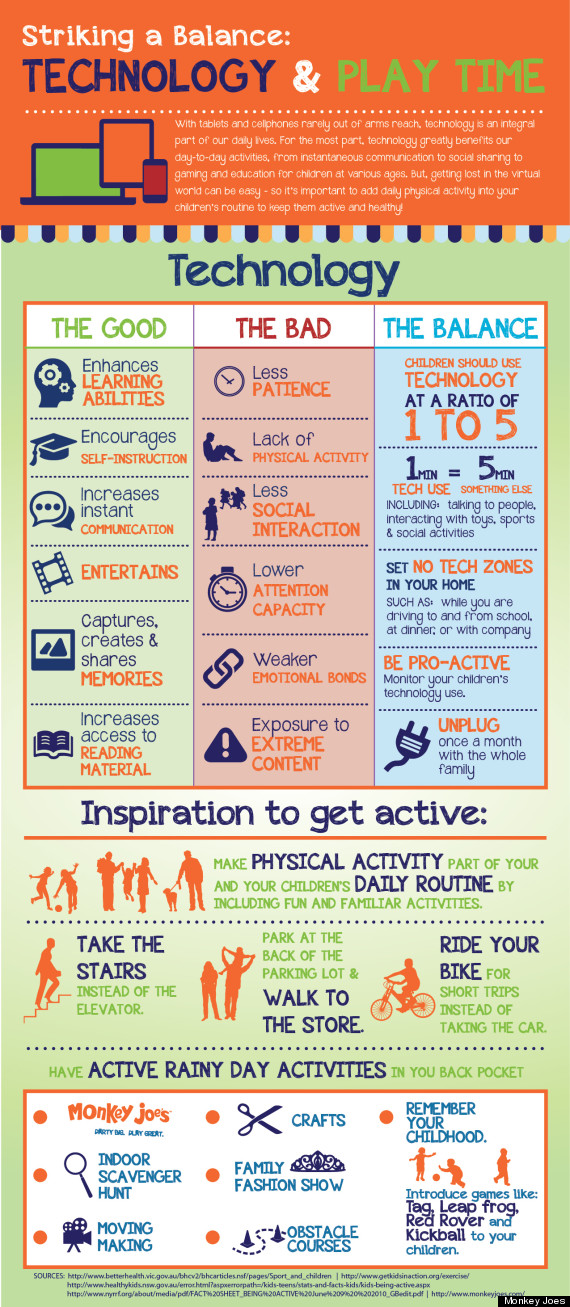


Like anything in life, the real answer is balance.   Finding something that works well for you and your family.   I know that writing this post has brought a lot of ideas for me to share with my husband about our three kids and screen time, as well as the important part of practicing what we preach.   I hope you have found this information useful!

Please feel free to leave comments below if you have ideas for future posts or would like to see something featured on the blog.   It's great to be back!


Resources:

Holland, Beth. "The Balance of Screen Time." Edutopia. Edutopia, 09 Sept. 2013. Web. 05 Mar. 2014. <http://www.edutopia.org/blog/balance-of-screen-time-beth-holland>.


Knorr, Caroline. "How to Set Screen Rules That Stick." Reviews & Age Ratings. Common Sense Media, 11 Sept. 2012. Web. 05 Mar. 2014. <http://www.commonsensemedia.org/blog/how-to-set-screen-rules-that-stick>.

"Managing Media: We Need a Plan." Managing Media: We Need a Plan. American Academy of Pediatrics, 28 Oct. 13. Web. 03 Mar. 2014. <http://www.aap.org/en-us/about-the-aap/aap-press-room/Pages/Managing-Media-We-Need-a-Plan.aspx>.

"Media and Children." Media and Children. American Academy of Pediatrics, n.d. Web. 03 Mar. 2014. <http://www.aap.org/en-us/advocacy-and-policy/aap-health-initiatives/pages/media-and-children.aspx>.

Velez, Mandy. "A Practical Guide To Balancing Screen Time And Play Time." The Huffington Post. TheHuffingtonPost.com, 24 Jan. 2014. Web. 05 Mar. 2014. <http://www.huffingtonpost.com/2014/01/24/balancing-tech-and-playtime-infographic_n_4653793.html>.


Monday, December 9, 2013

Connected Classroom Hangout: Danny the Champion the World with Lucy Dahl

I'm posting a little bit earlier this week to share a very cool activity that just took place at Roosevelt School.  Today, Mrs. Filipiak's 3rd grade classroom had a very unique opportunity.   Before Thanksgiving, they were sent copies of the book, Danny, the Champion of the World by Roald Dahl.  Over Thanksgiving Break the third grade students read the book and when they returned, submitted questions in preparation for today's Connected Classroom Hangout with Lucy Dahl, Roald Dahl's daughter, and with Elizabeth Findley who works with Matilda, the Musical, on Broadway.  It was a BEYOND amazing experience for the students who personally got to interact with both Lucy in Los Angeles and Elizabeth in New York.   Lucy had some amazing information to share about her father and the kids and adults involved learned a lot!    Some students even were able to make some very unique and interesting connections with Roald Dahl.   As a big "Oprah type" surprise at the end, the students received the book, Matilda, as a thanks for participating gift.  They were beyond thrilled. Check out the video of the entire experience in the YouTube Video below.  Thank you to +Matilda The Musical Broadway and +Connor Swenson for such an amazing opportunity!   

Thursday, December 5, 2013

Samples of Success: Room 312's Survival "Handbook"

Currently, Mr. Mulvihill's 5th grade class is in the middle of their rotation of using the Chromebooks as well as just finished reading the novel, My Side of the Mountain.   Mr. Mulvihill has traditionally read this novel with his 5th grade class and has had the students keep track of different plants and animals that are used as a means of survival, while reading the novel.   This year, with the Chromebooks at Room 312's fingertips, they were were able to take this survival study a bit further.  In collaborating with myself, the Instructional Technology Coach, and Ms. Diekman, we were able to come up with an awesome project ot take their findings a step further.  Ms. Diekman, our wonderful Library Information Specialist, worked with Room 312 showing them how to research and take notes on the different survival items that were in the novel they read. After completing the research with Ms. D, then I went into his classroom to teach the kids how to use Google Sites.  As a class, collaborating on research and collaborating on creating a website, you can see how their hard work has transformed into a wonderful working website.  Please click here to view the website.


This project was a great way to meet many of our National Educational Technology Standards (NETS) while deepening the student's understanding of how different plants and animals can be used for
survival.   In addition to meeting the NETS standards for students, this activity also met a variety of the Common Core State Standards for English Language Arts.
  • CCSS.ELA-Literacy.RL.5.10 By the end of the year, read and comprehend literature, including stories, dramas, and poetry, at the high end of the grades 4–5 text complexity band independently and proficiently.
  • CCSS.ELA-Literacy.W.5.6 With some guidance and support from adults, use technology, including the Internet, to produce and publish writing as well as to interact and collaborate with others; demonstrate sufficient command of keyboarding skills to type a minimum of two pages in a single sitting.
  • CCSS.ELA-Literacy.W.5.7 Conduct short research projects that use several sources to build knowledge through investigation of different aspects of a topic.
  • CCSS.ELA-Literacy.W.5.8 Recall relevant information from experiences or gather relevant information from print and digital sources; summarize or paraphrase information in notes and finished work, and provide a list of sources.
Mr. Mulvihill's class did an amazing job on this assignment, and their website looks amazing!   I hope you enjoy reading their hard work and seeing an excellent sample of success from our 5th graders!

Thursday, November 21, 2013

Hour of Code

We live in a world surrounded by technology. But only a tiny fraction of students learn how computers work, or how to create software technology. Computer Science provides a foundation for virtually any career and all our students can benefit from learning the basics. 

This year, for Computer Science Education Week, a massive campaign called the Hour of Code is introducing 10 million students to try one hour of introductory computer science.

Watch the video below to find out more or check out the Hour of Code website by clicking here.  At Roosevelt, we are offering the Hour of Code to classrooms, and the computer club is participating during their meeting.   You can also participate at home if you'd like!   Check out the Hour of Code website if you are interested.


I hope everyone has a restful and relaxing Thanksgiving Break!

Wednesday, November 6, 2013

Common Sense Media: A Great Resource for Families

Common Sense Media is a wonderful resource for families to utilize in terms of seeking out what's going on in the world of media - which is a huge part of our children's lives today.  From movies, TV, apps, games, etc., Common Sense Media has a range of resources to help parents educate themselves on what's age appropriate and what's best for kids.   Common Sense Media is dedicated to improving the lives of kids and families by providing the trustworthy information, education, and independent voice they need to thrive in a world of media and technology. You can access a variety of content from Common Sense Media just by going on their site, however, there are even more resources if you create a free account.   Click here to visit Common Sense Media

One thing that I highly suggest reviewing together as a family is the  Digital Citizenship Section.  It's important in the world we live in today to be open about what the expectations are for being a good Digital Citizen, and how to stay safe online.   By law, we teach students on a yearly basis about what it means to a good digital citizen at school.  Common Sense Media has some great resources for how to continue this conversation at home. Click here if you'd like to read more and to see a helpful video you can share with your children.  

If you'd like to see a topic featured on the Roosevelt Bits and Bytes Blog, please leave a comment below.  I'd love to know what topics you'd like to see featured!  Thanks for reading!